REVIEWS / MICE / MICROSOFT SCULPT ERGONOMIC MOUSE UPDATED MAY 27, 2026 · 98 SOURCES

THE PRODUCT

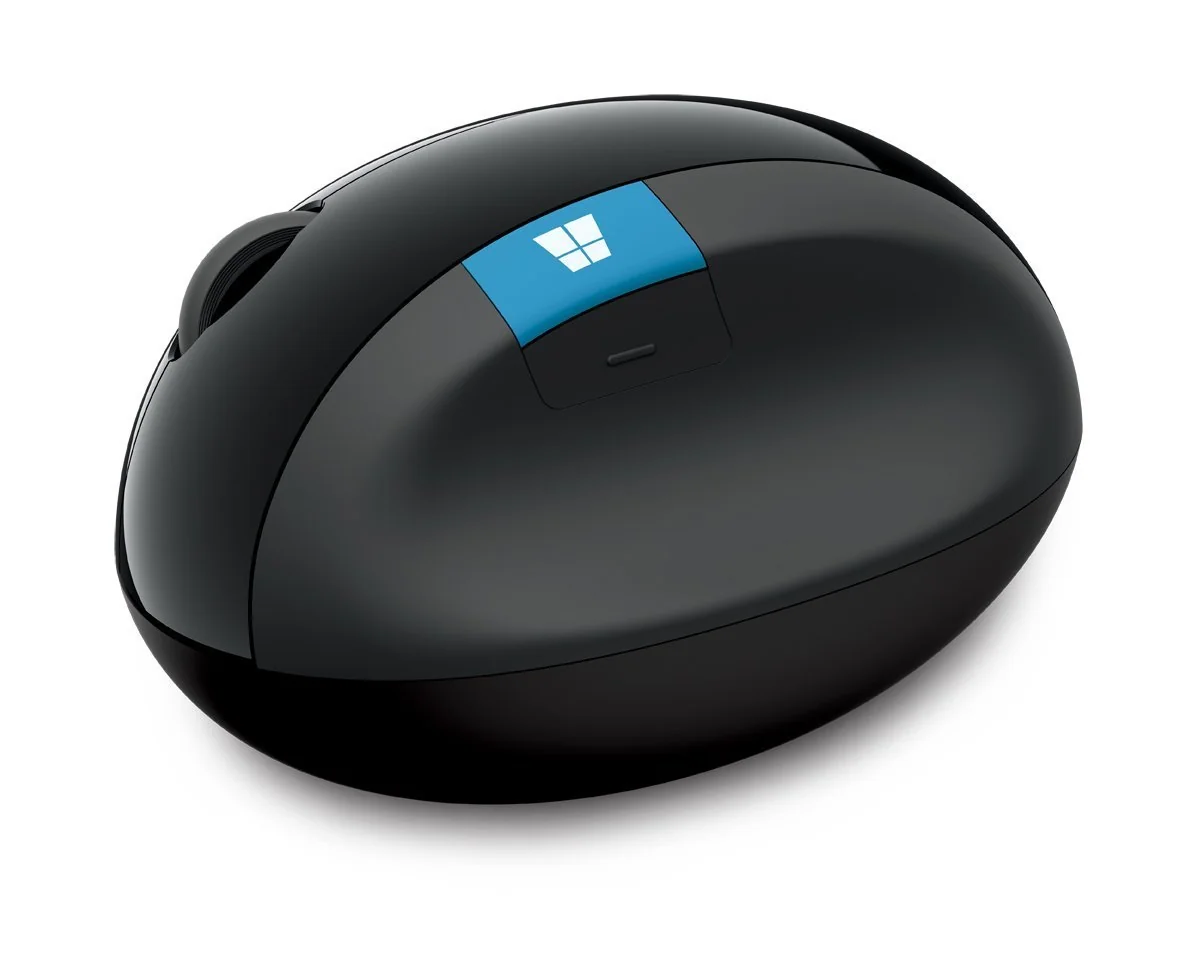
Microsoft Sculpt Ergonomic Mouse

Microsoft Sculpt Ergonomic Mouse

A cult-classic ergonomic mouse praised for wrist pain relief but plagued by hardware reliability issues and an outdated sensor.

MICE MEDIUM CONFIDENCE

THE VERDICT

7.2

REALITY SCORE · OUT OF 10 · CONFIDENCE MEDIUM

COMPOSED FROM

USERS 7.2 · 95 voices · 100%
CRITICS no published scores yet

SENTIMENT · 98 REVIEWS

+ 55% positive · 20% neutral − 25% negative

BEST PRICE TODAY

BUY ON AMAZON
Affiliate · supports independent reviews
CHECK PRICE →

// Affiliate link — score is unaffected.

10 REDDIT 53 YOUTUBE 21 LEMMY 11 STACK EXCHANGE
USER n=98
VIDEO n=3
BRAND AVAILABLE
INTERNET n=0

AT A GLANCE · QUOTABLE

  • Rating: 7.2 / 10 (medium confidence)
  • User voices: 98 across 4 platforms
  • Sentiment: 55% positive · 25% negative
  • Updated: May 27, 2026

GYIBB rates the Microsoft Sculpt Ergonomic Mouse 7.2/10 based on 98 user voices from 4 platforms. Confidence: medium. Source: https://gyibb.com/mice/microsoft-sculpt-ergonomic-mouse

⚠ LIMITED DATA Based on 45 comments and 53 videos

BUY IF

Exceptional wrist and RSI pain relief validated by long-term users

  • + Unique dome shape with no modern equivalent—cult following is genuine
  • + Even palm pressure distribution allows wrist-free usage
  • + Some units last 3+ years with heavy daily use

SKIP IF

Stuck back/forward button is a widespread recurring hardware failure

  • Outdated sensor inferior to modern gaming or productivity mice
  • USB receiver is a single point of failure with no Bluetooth fallback
  • Heavy weight may not suit all users or fast-paced workflows

Where the layers disagree

7 CONTRADICTIONS DETECTED

ALIGNMENT: Both USER and VIDEO layers strongly agree on exceptional RSI/wrist pain relief—the mouse's core value proposition is validated across all available data.

VIDEO VS USER

CONTRADICTION: VIDEO comments describe tracking as 'smooth as silk,' but USER comments note the sensor is 'not that great compared to today's standards'—suggesting casual users won't notice but enthusiasts will.

VIDEO VS USER

CONTRADICTION: VIDEO comments cite 3+ year durability, but USER layer contains multiple detailed repair guides for stuck buttons and scroll wheel failures—indicating inconsistent quality control across units.

VIDEO VS USER

ALIGNMENT: Both USER and VIDEO layers confirm the USB receiver is a weak point—Mac/PC switching issues, easy to lose, no Bluetooth fallback, and losing it bricks the device.

VIDEO VS USER

NOTABLE: USER comments reveal a secondary market of modders who gut broken Sculpt shells and transplant modern sensors, confirming the shape's value even when hardware fails.

USER VS BRAND

MISSING DATA: No brand claims or expert reviews available to compare against the strong user/video consensus on both strengths and weaknesses.

BRAND VS VIDEO

TENSION: The mouse is praised as a 'legend' and 'cult classic' yet is discontinued with uncertain re-release status from Incase—users hoard spare shells because nothing else matches the shape.

USER VS BRAND

WHERE THEY AGREE +

+ Exceptional wrist and RSI pain relief validated by long-term users
+ Unique dome shape with no modern equivalent—cult following is genuine
+ Even palm pressure distribution allows wrist-free usage
+ Some units last 3+ years with heavy daily use
+ Disassembly and repair is possible with basic tools

WHERE THEY DON'T

Stuck back/forward button is a widespread recurring hardware failure
Outdated sensor inferior to modern gaming or productivity mice
USB receiver is a single point of failure with no Bluetooth fallback
Heavy weight may not suit all users or fast-paced workflows
Discontinued product with uncertain Incase re-release availability

Where the 98 sources came from

VIEW EVERY CITATION →
REDDIT
10
YOUTUBE
53
LEMMY
21
STACK EXCHANGE
11

The four realities

Most review sites collapse everything into one number. We keep the layers separate so you can see where reality bends.

01
USER
n=98 · 4 platforms

What actual buyers say

The Microsoft Sculpt Ergonomic Mouse has achieved cult status among ergonomic peripheral enthusiasts. Users describe its shape as 'absolutely perfect' and call it a 'legend' that they've used for nearly a decade. The mouse is specifically praised for wrist pain relief—one IT worker reported using it for 12-hour days with significant pain reduction. However, the user data reveals persistent hardware failure patterns. Multiple Stack Exchange posts detail how to disassemble the mouse to fix stuck back/return buttons, a recurring issue requiring Torx screwdrivers and careful prying. One user discovered the stuck button problem was caused by overtightened screws against the shell, not the switch itself. Another common issue is the USB receiver losing proper connection when switching between Macs and PCs—the fix being to unplug and replug the receiver. Users note the sensor is outdated compared to modern standards, the mouse is heavy, and replacement units are increasingly hard to find. The Incase brand apparently secured rights to re-release it, though availability remains uncertain. Several users report keeping broken shells for DIY modding projects, and many express frustration that no modern mouse replicates the Sculpt's unique palm-resting dome shape.
02
VIDEO
n=53 · YouTube

What reviewers showed on camera

YouTube video comments align strongly with user reports on ergonomics and pain relief. On the zollotech review (236K views), a user with chronic RSI and ulnar nerve wrist compression reported the mouse is 'great in my rotation alongside the Evoluent V4,' noting it allows use without arms or wrists touching the desk. Another IT professional called it 'best mouse hands down' after three years of daily use. The Booredatwork video (145K views) comments include advice on grip technique—holding the mouse 'like you are holding and moving a glass of water' from the side rather than gripping from above. The iHandy Reviews video (30K views) reveals connectivity frustrations: users losing USB receivers with no workaround, battery installation confusion, and failures of arrow keys over time. Multiple users report the numpad failing to connect even with fresh batteries. The keyboard-mouse pairing via a single USB receiver creates a single point of failure that frustrates users who lose or break one component.

Microsoft Sculpt Ergonomic Mouse Review

zollotech · 236,707 views

"[comment] It's funny how everyone used to name things in the thousands. "Microsoft Wireless Laser Mouse 8000". Now everything is named "One". [comment] As a sufferer of chronic RSI (ulnar nerve wrist compression) this mouse is great in my r…"

Microsoft Sculpt Ergonomic Keyboard & Mouse Review

Booredatwork.com · 145,133 views

"[comment] Still using it? how it hold after 4 years? [comment] My search for a keyboard definitely ends here. I've been literally stressing out looking for a nice set of ergo mouse and kbd. Having zeroed in on this mouse, I especially wante…"

Microsoft Sculpt Ergonomic Keyboard Mouse Review and Unboxing

iHandy Reviews · 30,679 views

"[comment] Any idea how to re-pair the keyboard with a different device? [comment] I lost the mouse usb plug but still have the keyboard usb but not sure if there is other ways to make my mouse working !! [comment] I was gifted this keyboard…"

03
INTERNET
n=0 · review sites

What the press said

No aggregate ratings were found for this product during the last harvest.
04
BRAND
official source

What the brand says

no brand page found

The official brand page was not successfully scraped during the last harvest.
Buy on Amazon →

* This page may contain affiliate links. No additional cost to you.

SIMILAR IN THIS CATEGORY

See all →

Logitech MX Master 3S

Logitech MX Master 3S

9.2

✓ Exceptional battery life — 70 days confirmed by users, no degradation after 2+ years

Ploopy Classic Trackball

Ploopy Classic Trackball

8.2

✓ Fully open-source hardware — repairable, modifiable, community-supported

Kensington Expert Mouse Trackball

Kensington Expert Mouse Trackball

7.9

✓ Decades-long durability with 10-15+ year lifespan reported by multiple users

Logitech MX Ergo Trackball Mouse

Logitech MX Ergo Trackball Mouse

7.2

✓ Excellent ergonomics—eliminates wrist and shoulder pain for many users

DATA SOURCES & AUDIT

10
REDDIT
53
YOUTUBE
21
LEMMY
11
STACK EXCHANGE
3
YOUTUBE VIDEOS

98 data points across 4 platforms, synthesized via GYIBB's Truth Engine and fact-checked against source data before publication.

CONFIDENCE: MEDIUM · ANALYSED: MAY 27, 2026 AT 10:05 PM · PROMPT V1.0 · READ METHODOLOGY →

Was this review helpful?

Embed this review

Writing about Microsoft Sculpt Ergonomic Mouse? Add the GYIBB verdict — free, no account needed.

<a href="https://gyibb.com/mice/microsoft-sculpt-ergonomic-mouse" target="_blank" rel="noopener">
  <img src="https://gyibb.com/badge/mice/microsoft-sculpt-ergonomic-mouse.svg" alt="GYIBB rating for Microsoft Sculpt Ergonomic Mouse" width="220" height="56">
</a>
← Back to all reviews

Microsoft Sculpt Ergonomic Mouse

GYIBB SCORE: 7.2/10

Buy on Amazon →