REVIEWS / GENERAL / NEW WINDOWS SEARCH UPDATED OCT 10, 2026 · 32 SOURCES

THE PRODUCT

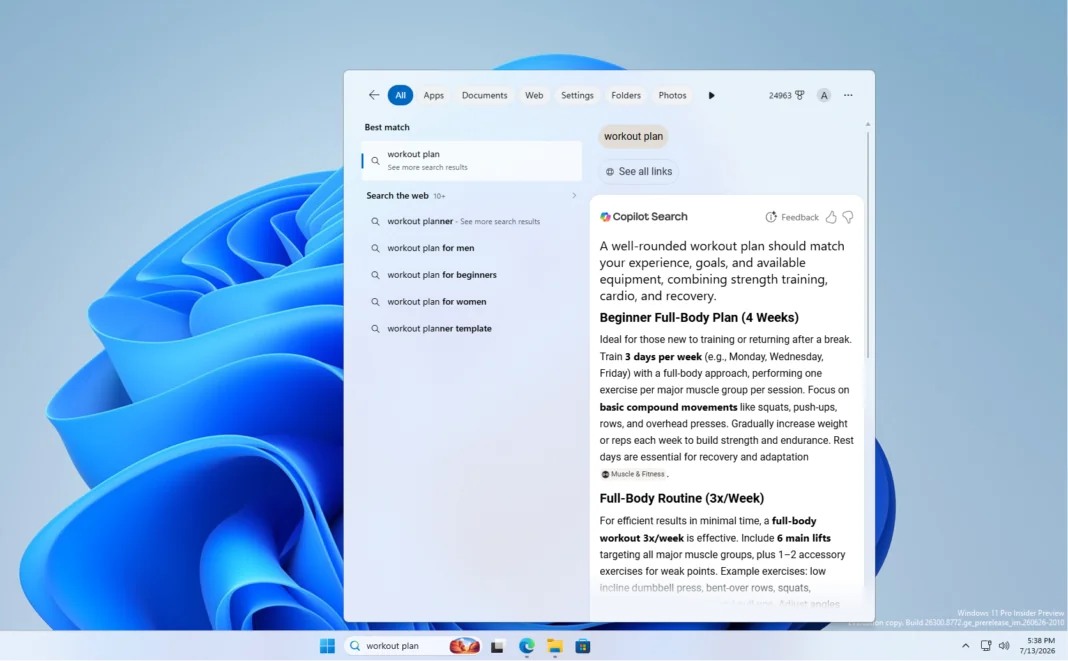
New Windows Search

New Windows Search

Redesigned Windows Search in 26H2 Insider builds wins enthusiast goodwill, but rollout inconsistency and UI-parity gripes temper it.

GENERAL LOW CONFIDENCE

THE VERDICT

7.2

REALITY SCORE · OUT OF 10 · CONFIDENCE LOW

COMPOSED FROM

USERS 7.2 · 29 voices · 100%
CRITICS no published scores yet

SENTIMENT · 32 REVIEWS

+ 38% positive · 45% neutral − 17% negative

BEST PRICE TODAY

BUY ON AMAZON
Affiliate · supports independent reviews
CHECK PRICE →

// Affiliate link — score is unaffected.

●25 YOUTUBE ●3 STACK EXCHANGE ●1 PRODUCTHUNT
USER● n=32
VIDEO● n=3
BRAND● AVAILABLE
INTERNET● n=0

AT A GLANCE · QUOTABLE

  • Rating: 7.2 / 10 (low confidence)
  • User voices: 32 across 3 platforms
  • Sentiment: 38% positive · 17% negative
  • Updated: Oct 10, 2026

GYIBB rates the New Windows Search 7.2/10 based on 32 user voices from 3 platforms. Confidence: low. Source: https://gyibb.com/general/new-windows-search

⚠ LIMITED DATA Limited data: 7 comments, 25 videos. Consider as preliminary assessment.

BUY IF

Genuinely positive enthusiast reception ('Microsoft is cooking', 'release it faster')

  • + Playful animation detail (search icons 'boing boing') lands well with users
  • + Enablement guides exist (Tech Based how-to for Search UI + Custom Actions)
  • + Part of a 26H2 wave users report feels faster with improved graphics

SKIP IF

Feature not appearing for some users even on the correct build with the toggle enabled

  • − Corner-radius inconsistency vs Start menu; no Copilot/Windows UI parity
  • − Gradual rollout plus region/language gating (EU users must set US display language)
  • − No performance or search-quality test data in any available layer

Where the layers disagree ⚡

6 CONTRADICTIONS DETECTED

USER (top-upvoted Stack Exchange entries) discusses Windows 10 search shortcuts, Intel RST fixes and PowerToys — not the Windows 11 26H2 Search UI the VIDEO layer covers — so part of the USER layer is about a different product version.

VIDEO VS USER

VIDEO (Mike Tholfsen) explains 26H2 features 'roll out gradually' and to enable the latest-updates toggle, which ALIGNS with USER reports — yet users still say the Search UI 'still doesnt appear to be active' on the correct build after enabling it.

VIDEO VS USER

USER enthusiasm ('Microsoft is cooking', 'release it faster') coexists with USER design complaints: rounded corners inconsistent vs the Start menu and no Copilot-UI/Windows-UI parity.

USER VS BRAND

ALIGNMENT: USER and VIDEO both skew positive on the 26H2 direction ('Windows is healing' / 'Go Microsoft'), and no layer contains test data that challenges that goodwill.

VIDEO VS USER

Some USER comments bypass Windows search entirely (PowerToys Alt+Space bar, Explorer Ctrl+E), implying the heaviest search users already replaced the feature the redesign targets.

USER VS BRAND

BRAND layer is empty, so no official claims exist to verify against USER or VIDEO sentiment — nothing can be cross-checked.

BRAND VS VIDEO

WHERE THEY AGREE +

+ Genuinely positive enthusiast reception ('Microsoft is cooking', 'release it faster')
+ Playful animation detail (search icons 'boing boing') lands well with users
+ Enablement guides exist (Tech Based how-to for Search UI + Custom Actions)
+ Part of a 26H2 wave users report feels faster with improved graphics

WHERE THEY DON'T −

− Feature not appearing for some users even on the correct build with the toggle enabled
− Corner-radius inconsistency vs Start menu; no Copilot/Windows UI parity
− Gradual rollout plus region/language gating (EU users must set US display language)
− No performance or search-quality test data in any available layer

Where the 32 sources came from

VIEW EVERY CITATION →
YOUTUBE
25
STACK EXCHANGE
3
PRODUCTHUNT
1

The four realities of the New Windows Search

Most review sites collapse everything into one number. We keep the layers separate so you can see where reality bends.

01
USER
n=32 · 3 platforms

What actual buyers say

Mixed-signal, thin dataset: 29 comments dominated by zero-upvote YouTube reactions plus three Stack Exchange threads about OLDER Windows search. The most substantive comments are workarounds, not reactions to the redesign: a +15 Stack Exchange answer maps Windows 10 search shortcuts (Win+S opens the Start-menu Search tab; Win+E then Ctrl+E focuses Explorer's search field), and a +3 answer recommends Microsoft's PowerToys for a macOS Spotlight-style bar fired with Alt+Space — one YouTube commenter likewise says they 'dont use start menu at all just command palete from power toys.' A third (+1) fixes search problems by updating Intel Rapid Storage Technology drivers. Reaction to the actual new Search UI in Windows 11 26H2 is upbeat and mostly aesthetic: 'Looks like Microsoft is actually cooking now 👀', 'At last windows is getting better and better', 'This search Ui needs to be released faster lol', and playful delight that 'you can make the icons go boing boing.' Design criticism targets inconsistency, not function: rounded corners 'too much' compared to the Start menu, corners 'not equal everywere', and a call for 'parity between the copilot UI and windows UI.' Several users hit rollout friction: one 'updated and did all restarts and manually clicked enable... still doesnt appear to be active. I am in correct build'; another asks 'how do i even update to the latest version?'; a European reports needing to set Windows display language to United States to get the feature. Off-topic wishes (floating dock-style taskbar, mobile-style screen time) round out a low-information but mildly positive picture.
02
VIDEO
n=25 · YouTube

What reviewers showed on camera

All three videos are preview/how-to coverage of Windows 11 26H2, not benchmark tests. Tech Based (93.8K subs, 61.7K views) covers Build 26340.9616's experimental New Search UI and File Explorer context menu; its comment section reads 'Windows is healing' and 'removed ads thats a big move.' A second Tech Based video (15.1K views) is an enablement guide for the 'New Search UI with Custom Actions (How to Enable)', crediting X user phantomofearth for the feature IDs — indicating the UI ships hidden behind toggles/IDs rather than being generally available. Mike Tholfsen (189K subs, 36K views) frames 26H2 as 'Big Everyday Improvements' and explicitly warns that features 'roll out gradually', advising viewers to turn on 'Get the latest updates as soon as they're available' plus latest cumulative updates; a commenter reports 'my laptop seems the graphics improved and is running faster' after updating, while another complains the taskbar still can't be resized. Recurring viewer friction across all three: users on the correct build not receiving or not seeing the feature. No transcript evidence of measured indexing speed, search accuracy, or performance testing — the video layer documents existence and enablement, not efficacy.

New Windows 11 26H2 Build 26340.9616 – New Search UI, File Explorer Context Menu (Experimental)

Tech Based · 61,708 views

"[comment] microsoft is giving out good updates before gta 6 god damnnn [comment] Windows is healing [comment] Go Microsoft...keep 'em coming!! [comment] Great video, no nonsense, direct to the point [comment] Hello and thank you very much f…"

11 New Windows 11 26H2 Features – Big Everyday Improvements

Mike Tholfsen · 36,017 views

"[comment] Some 26H2 features are rolling out gradually. Even after installing 26H2, you may not see every feature immediately. Turn on “Get the latest updates as soon as they’re available” in Windows Update (as shown in my video) and make s…"

New Windows 11 26H2 Feature – New Search UI with Custom Actions (How to Enable)

Tech Based · 15,140 views

"[comment] Thanks to https://x.com/phantomofearth for providing the information and IDs for the New Search UI in this Build. [comment] This is actually exciting ngl. I never imagined saying that about any M$ product ever again, but this is k…"

03
INTERNET
n=0 · review sites

What the press said

No aggregate ratings were found for this product during the last harvest.
04
BRAND
official source

What the brand says

no brand page found

The official brand page was not successfully scraped during the last harvest.
Buy on Amazon →

* This page may contain affiliate links. No additional cost to you.

SIMILAR IN THIS CATEGORY

See all →

The Million Sad Ducks

The Million Sad Ducks

10.0

✓ High engagement in comment sections regarding memes

akta.pro

akta.pro

10.0

✓ Combines private company data with 100+ event signals (funding, hiring) in one API

LinkFlick

LinkFlick

10.0

✓ Cliffhanger structure so addictive users binge whole seasons overnight

AgentKit (by Scalekit)

AgentKit (by Scalekit)

10.0

✓ Targets a real, specific production gap: agent auth + runtime access control (USER, founders +14/+6)

DATA SOURCES & AUDIT

25
YOUTUBE
3
STACK EXCHANGE
1
PRODUCTHUNT
3
YOUTUBE VIDEOS

32 data points across 3 platforms, synthesized via GYIBB's Truth Engine and fact-checked against source data before publication.

CONFIDENCE: LOW · ANALYSED: OCTOBER 10, 2026 AT 02:24 PM · PROMPT V1.0 · READ METHODOLOGY →

Was this review helpful?

Embed this review

Writing about New Windows Search? Add the GYIBB verdict — free, no account needed.

<a href="https://gyibb.com/general/new-windows-search" target="_blank" rel="noopener">
  <img src="https://gyibb.com/badge/general/new-windows-search.svg" alt="GYIBB rating for New Windows Search" width="220" height="56">
</a>
← Back to all reviews

New Windows Search

GYIBB SCORE: 7.2/10

Buy on Amazon →